

The Journal 4.1.0.253
The Journal is a text editor with journaling capabilities
Program info
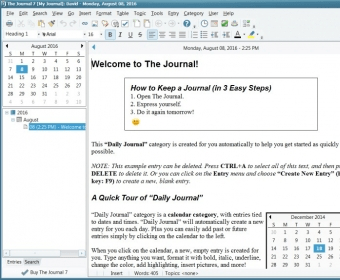
The Journal is a text editor with journaling capabilities. The main window is made up of a calendar and a list of entries on the left and the text editor window on the right. There are four tabs at top of the latter which take you to different writing modes.
The regular mode is Daily Journal, where you write about anything that you want. Your notes will be saved with a date stamp on them. Those notes will appear on the left under the month and year you wrote them, with a day stamp and hour stamp, too. Just like in Word, you can add images, objects, tables, etc. Each note will act like an independent document. The second mode is the Notebook mode. This allows you to write random notes that are not given any time stamps. You can use this for remainders, to-do notes, etc. The third tab is a template tab, which shows you how to use templates.
The Journal has different templates that you can use for several writing activities. Inserting them is easy and, although they are not very elaborate, they serve a very simple purpose well. The Journal could be a really fun way of creating a scrapbook, but the support for images is basic, at best. To complete the package there is a security feature which would act as a lock for your diary. Add a username, a password, and you can rest assured that no one will read your secrets.
Pros
- Lots of features
- Security
- Nice design
Cons
- None
Details
Extensions

No information available
The data will be available later.Awards

Related software

Keep records of all those activities and thoughts that make your life unique.

Use diary software to keep your life organized and record your daily activities.

Useful tree-styled personal information manager.
Related stories
See all
Microsoft gradually turns Edge into an AI browser with all the bells and whistles. Read on to learn what's already under the hood and what's coming.

Here are some Windows 11 enhancements tools (PowerToys, Windhawk, Flyoobe, Winaero Tweaker, UWT) for ultimate customization and control post-installation.

Claude’s Constitution puts AI character, AI values, and Amanda Askell’s work at Anthropic in public view. The next question is who should write the moral personality of AI.


Comments